๐Ÿ”’ Independent app โ€” not affiliated with, endorsed by, or officially connected to IRCTC, Indian Railways, or the RailOne app. Details
โœจ RailDesk 3.0
๐Ÿš† For Indian train travellers

Be ready the minute train booking opens.

Train seats go in minutes. RailDesk works out when booking opens for every journey, gets you ready the evening before, and rings at 7:50 so you're logged in when the 8:00 window opens. Then it keeps every trip as a ticket, from planned to booked to travelled.
โš ๏ธ RailDesk doesn't book tickets or show live train status. It gets you ready and opens the official booking and PNR status pages in one tap.
7:50Alarm before the 8:00 window
Android 8.0+Light and dark
0Accounts needed
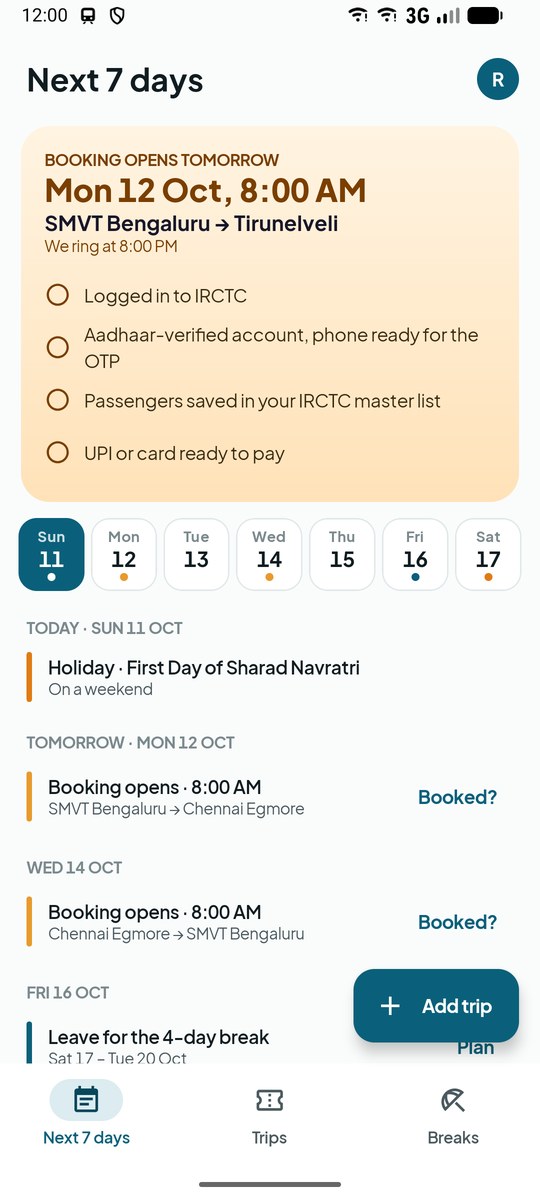
Next 7 days: booking opens tomorrow at 8:00 AM, with a get-ready checklist

Screenshots

A look inside RailDesk 3.0

Real screens from the app, with demo trips between SMVT Bengaluru, Chennai Egmore and Tirunelveli.
Next 7 days with booking opening tomorrow and a get-ready checklist
Next 7 daysWhat to book and when
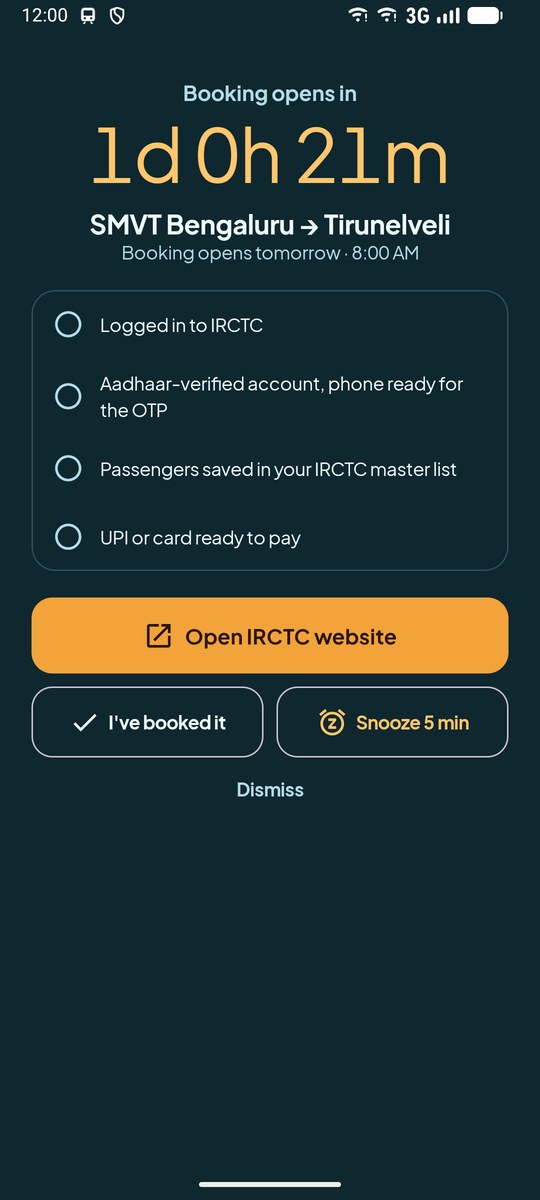
Full-screen alarm counting down to the booking window with a checklist
The alarmCountdown and checklist at 7:50
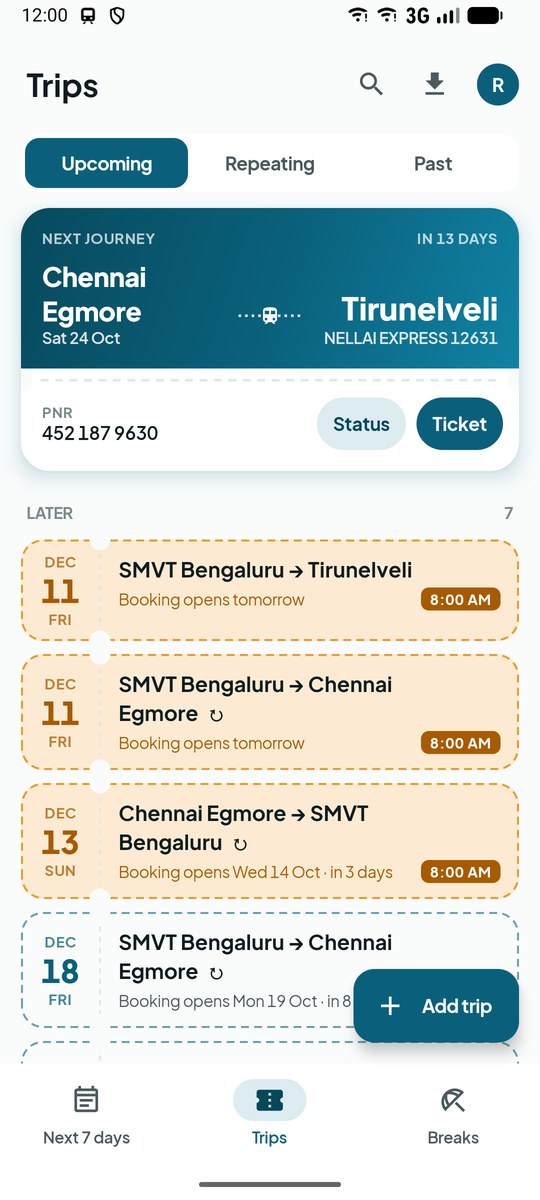
Trips as tickets: the next journey and planned trips with booking dates
Trips as ticketsBooked, planned and coming up
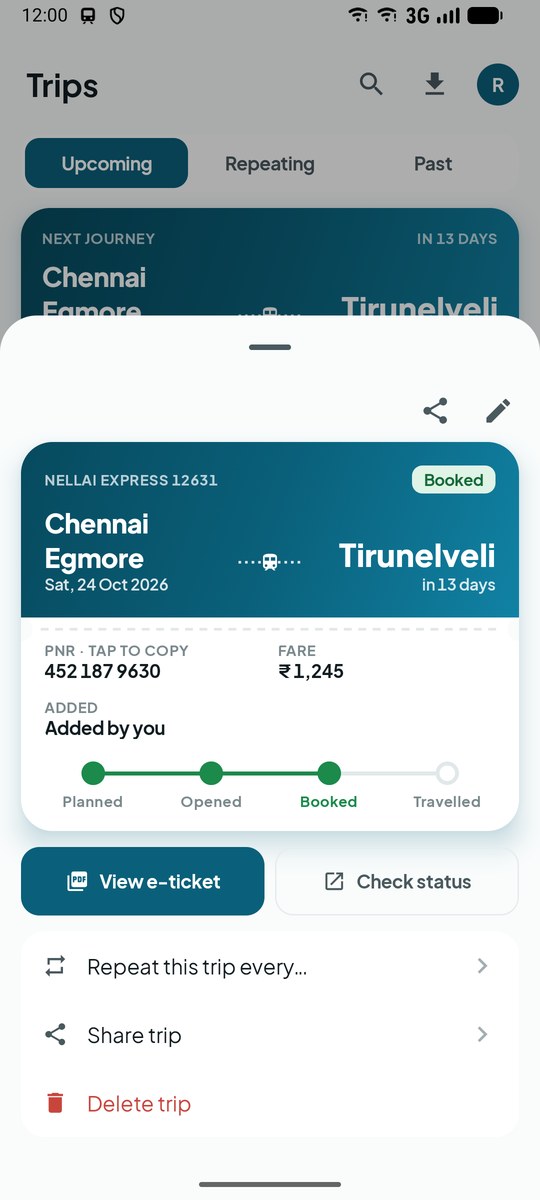
A trip opened as a boarding pass with PNR, fare and status track
Boarding passPNR, fare, e-ticket, status
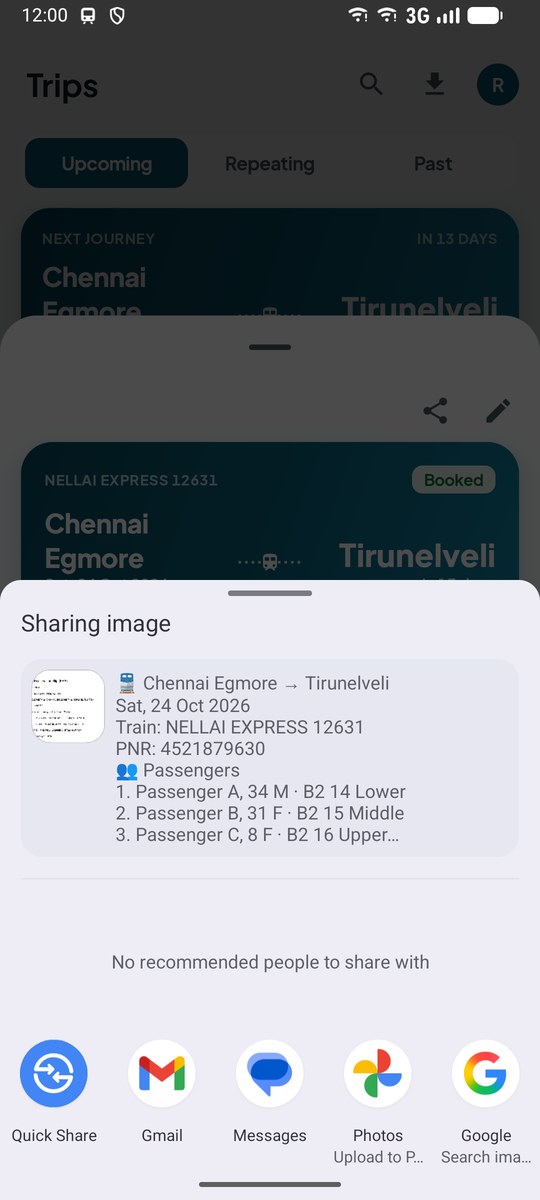
Sharing a ticket with route, PNR and each passenger's berth
Share with your groupEvery passenger's berth
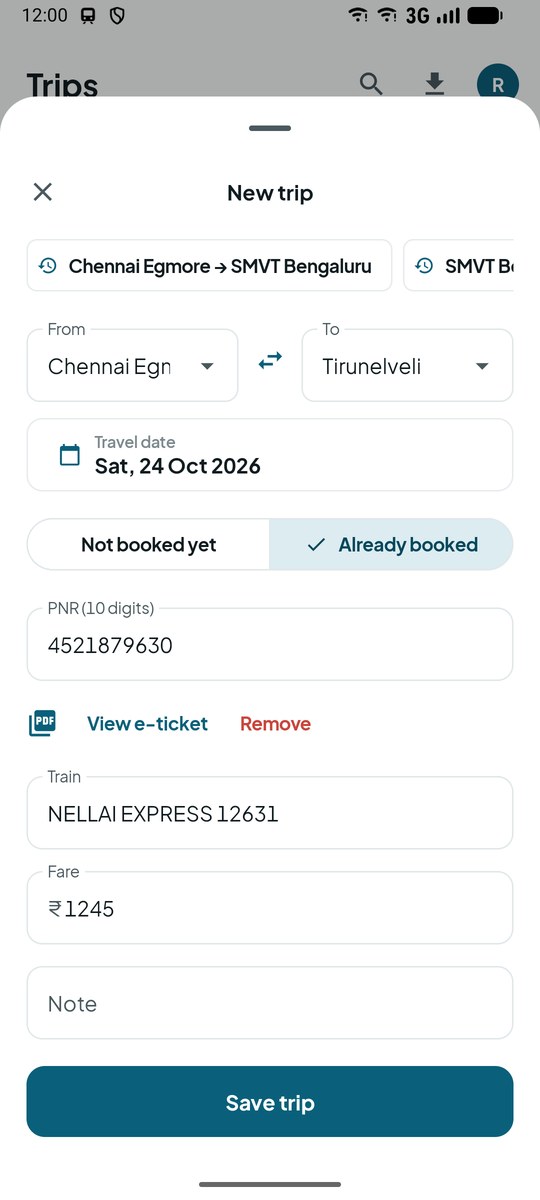
A trip filled in from an e-ticket PDF
E-ticket importThe PDF fills in the trip
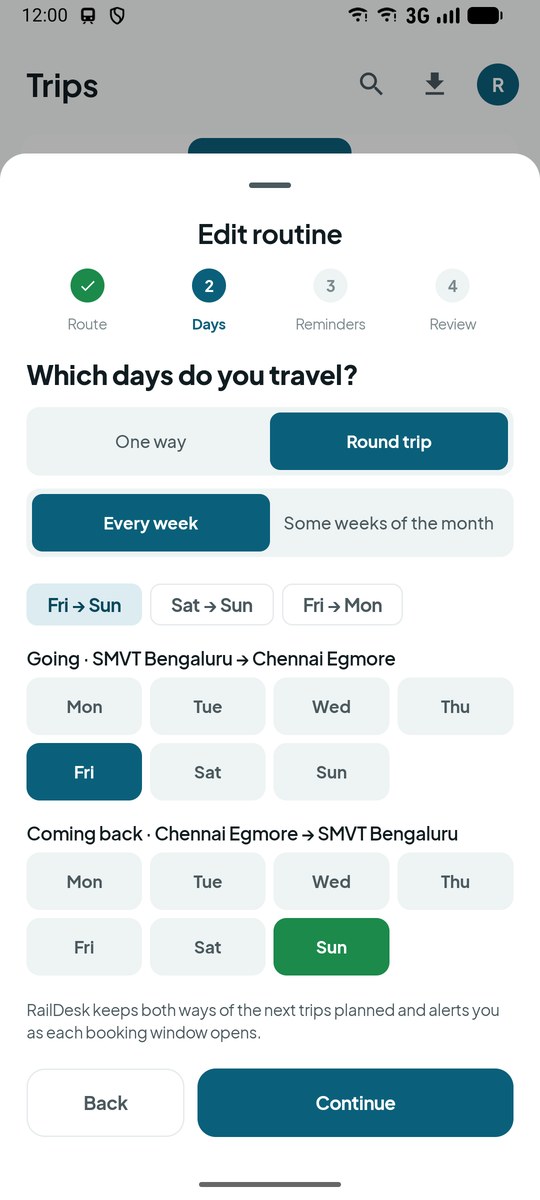
Setting up a round-trip routine: out Friday, back Sunday
RoutinesOut Friday, back Sunday
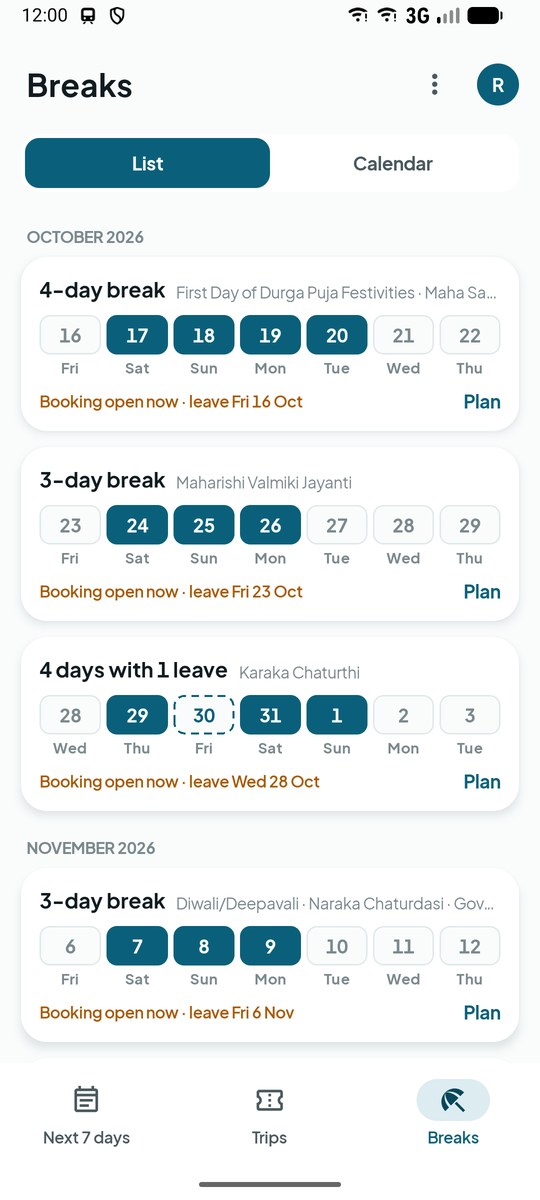
Breaks: long weekends with the leave day that makes them longer
BreaksEvery long weekend
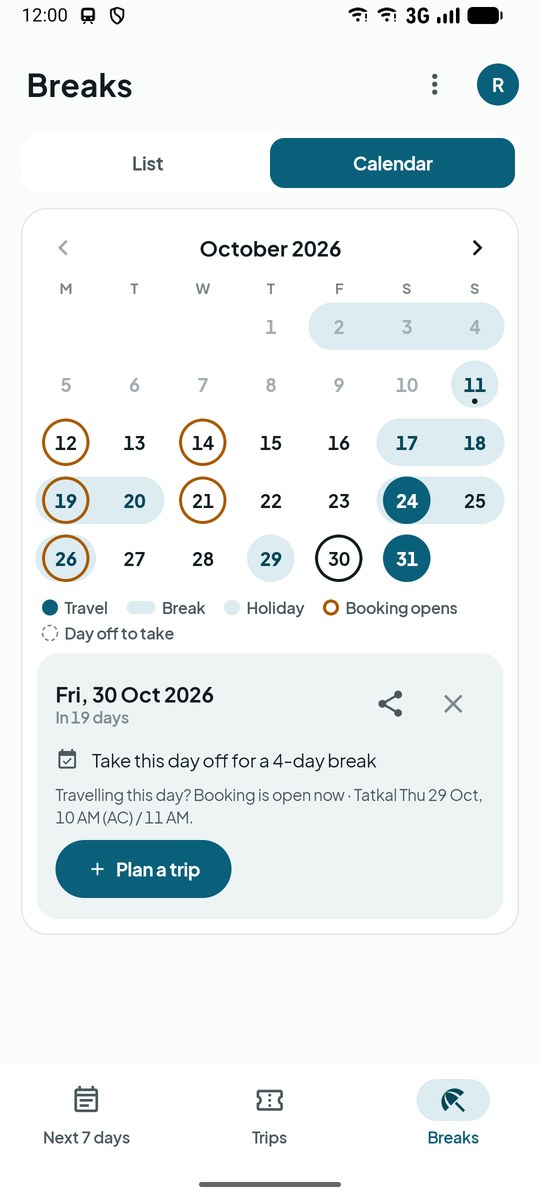
Calendar of holidays, breaks, trips and booking days
CalendarTap a day to plan or share it
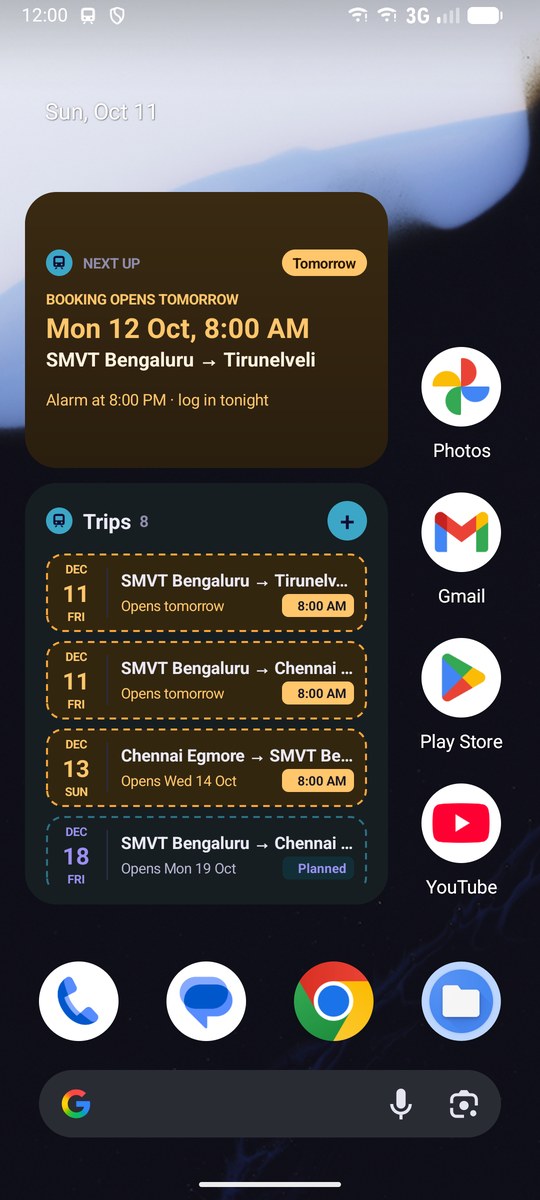
Next up and Trips widgets on a dark home screen
WidgetsLight and dark
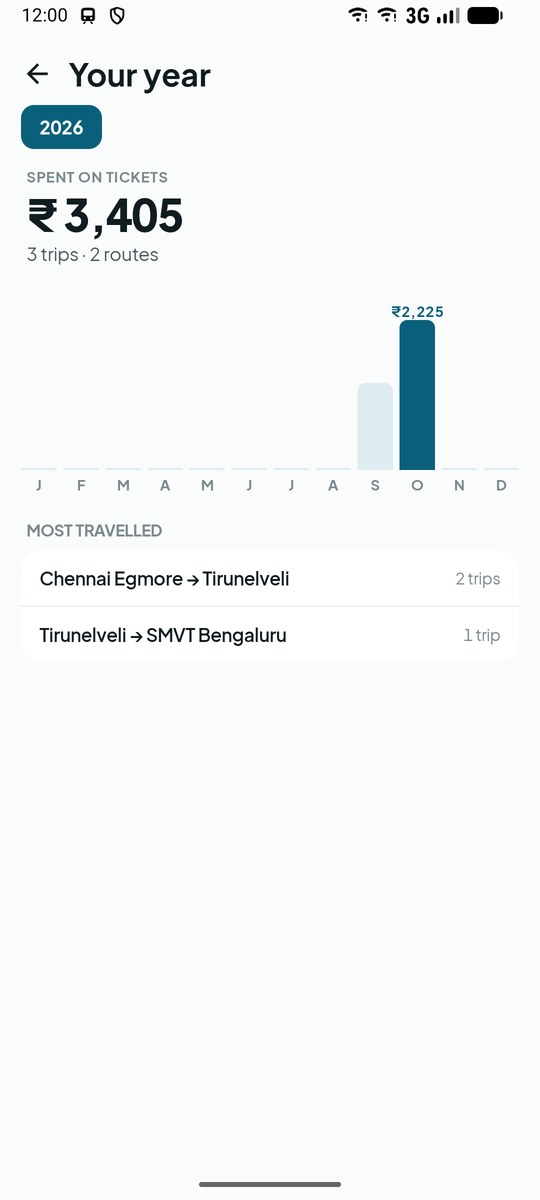
Your year: spending on tickets by month and most travelled routes
Your yearSpending and top routes

Features

Built around the minute booking opens

General booking opens at 8:00 AM, 60 days before you travel, and Tatkal the day before. Everything in RailDesk is there to get you ready for that minute, and to keep the ticket handy afterwards.

๐Ÿ—“๏ธ

Next 7 Days

What to book and when, with the next step highlighted. The day before a window opens: a get-ready checklist, then a live countdown.

โฐ

An Alarm That Rings

Full screen at 7:50, even on the lock screen, using Android's alarm-clock mode so battery saving can't delay it. One tap opens RailOne, the IRCTC app or the website.

๐Ÿ›ก๏ธ

Warns Before It Fails

If a phone setting would stop your alarm (battery restrictions, alarms turned off), RailDesk tells you and takes you straight to the fix.

๐ŸŽซ

Trips as Tickets

Booked, planned and coming up, at a glance. Tap one for a boarding pass with PNR, fare, your e-ticket and a one-tap status check.

๐ŸŒด

Breaks

Every long weekend and holiday in a list and a calendar, plus the one leave day that makes a break longer, and when booking opens for the day you'd leave.

๐Ÿ“„

Add It From the E-Ticket

Share your e-ticket PDF from your booking app and the trip fills itself in: route, date, train, PNR and fare. Or add a trip in three taps and see when booking opens.

๐Ÿ”

Routines

Out on Friday, back on Sunday. A routine plans its own trips and alerts, week after week, in both directions.

โšก

Tatkal Backup

Waitlisted? RailDesk offers Tatkal alerts: the evening before, and five minutes before AC (10 AM) or Non-AC (11 AM) opens.

๐Ÿ“ค

Share With Friends

Send a ticket with every passenger's berth, or a long weekend you're planning, on WhatsApp or anywhere.

Pricing

Free covers the essentials. Premium adds the rest.

Free shows a small ad on a few screens, never on the alarm; Premium has none. Premium is a one-time purchase through Google Play Billing: pay once, keep it for good. RailDesk never sees your payment details.

Free

Everything you need for the booking minute
  • โœ“ Next 7 days with the get-ready checklist and countdown
  • โœ“ Booking-window and Tatkal alarms, full screen at 7:50
  • โœ“ Trips as tickets and boarding passes: PNR, fare & e-ticket
  • โœ“ Quick add, and e-ticket PDF import
  • โœ“ Breaks and the holiday calendar
  • โœ“ Share tickets and breaks
  • โœ“ Your year: spending and top routes
  • โœ“ "Next up" home-screen widget
PREMIUM

Premium

Pay once ยท yours for good
  • ๐Ÿšซ No ads
  • ๐ŸŒด Alerts for long weekends and holidays, planned for you
  • ๐Ÿ” Routines, including round trips
  • ๐Ÿงฉ "Trips" widget with your upcoming journeys
  • โ˜๏ธ Daily backup to your own Google Drive

Home Screen

Your next booking, on the home screen

Two widgets that follow your phone's light or dark mode and update as soon as anything changes.

โณ

Next up ยท Free

When booking opens next, with your alarm time. On the day, it turns saffron with a button straight into your booking app.

๐ŸŽซ

Trips ยท Premium

Your upcoming trips as small tickets, with the next step and its date. Tap + to add one.

How It Works

From "I need to go" to boarding

1

Say where and when

A route and a date, or share your e-ticket. RailDesk shows when booking opens before you save, and sets the alarms for you.

2

Get ready, then book

The evening before: a checklist. On the day: a countdown and an alarm at 7:50 that opens your booking app. Waitlisted? Turn on the Tatkal backup.

3

Keep it and share it

Tap "I've booked it", attach the e-ticket, and share the ticket with everyone travelling, each with their berth.

At a Glance

The colour tells you what to do

Every screen and widget uses the same three colours, so you can tell at a glance what needs you.

Saffron: booking opens soon, act now
Teal: planned, alarms set
Green: booked, ticket kept

Privacy First

Built around your privacy, not your data.

No account needed. Your trips stay on your phone and are never shared with advertisers. Drive backup, if you turn it on, goes to your own private, hidden Drive storage that only RailDesk can access.

Read the full privacy policy โ†’
  • โœ“ Trips, routines & lists are stored on your phone; RailDesk has no server to send them to
  • โœ“ E-ticket PDFs are read entirely on your phone; nothing is uploaded
  • โœ“ Shared trip links keep the trip in the part of the link browsers never send to a server
  • โœ“ Drive backup uses Google's hidden drive.appdata folder, readable only by RailDesk through your own account
  • โœ“ Payments are handled entirely by Google Play Billing; RailDesk never sees card or UPI details
  • โœ“ The free version's ads come from Google AdMob, which gets device data to serve them but never your trips; Premium has none
  • โœ“ Anonymous usage statistics (Google Analytics for Firebase) count which screens and features get used, never what's in your trips

Get RailDesk 3.0 on Google Play

Free to download. Be ready for your next booking window.